
Your AI stack is now a target, but it’s being attacked in ordinary ways. When IBM analyzed breaches against AI models and applications in 2026, the two leading causes were compromised APIs, applications or plug-ins (27%) and cloud misconfigurations affecting AI workloads (27%) (IBM Cost of a Data Breach Report 2026). Exposed endpoints and bad configuration — against models, inference servers, agent frameworks, and the vendors behind them.
Early warning against those attacks, the foundation of AI security posture management, is achievable, and it’s what Dataminr is built to do. Dataminr detected the Fortinet FortiWeb zero-day 38 days before CISA cataloged it (Source: Intel Brief — Fortinet FortiWeb, 2025). It flagged VMware ESXi zero-day exploit activity 6 days before the CVEs were published to NIST NVD (Source: DIA — VMware ESXi, CVE-2025-22224/25/26). On AI infrastructure, where a technique often circulates in research and repositories well before it’s formally disclosed, that lead time is indispensable.
But a 38-day head start only becomes defense if you know the threat is yours. Thirty-eight days of warning about a vulnerability in software you don’t run is thirty-eight days of nothing. An AI threat that doesn’t apply to you isn’t a threat. It’s news.
Turning early signal into a decision requires one more join: the threat, matched against what you actually run. That join is what Dataminr Client-Tailored Threat Intelligence performs automatically, and this guide walks through setting it up for the AI stack specifically.
By the end you’ll have a saved search that surfaces only AI security threats intersecting your declared assets, an alert view showing which of your assets are affected and what’s predicted next, and a path from alert to Jira ticket without leaving the workflow.
What Client-Tailored Threat Intelligence Is Made Of
Two capabilities, each valuable alone, doing different jobs.
Dataminr Threat Intelligence answers what’s coming. Multi-modal fusion AI processes text, image and machine-signal anomalies across more than 1M public sources — deep web, dark web, open web, OSINT — and detects threats while they’re still forming rather than after a writeup exists. It’s predictive: it assesses how activity is changing and where it’s heading.
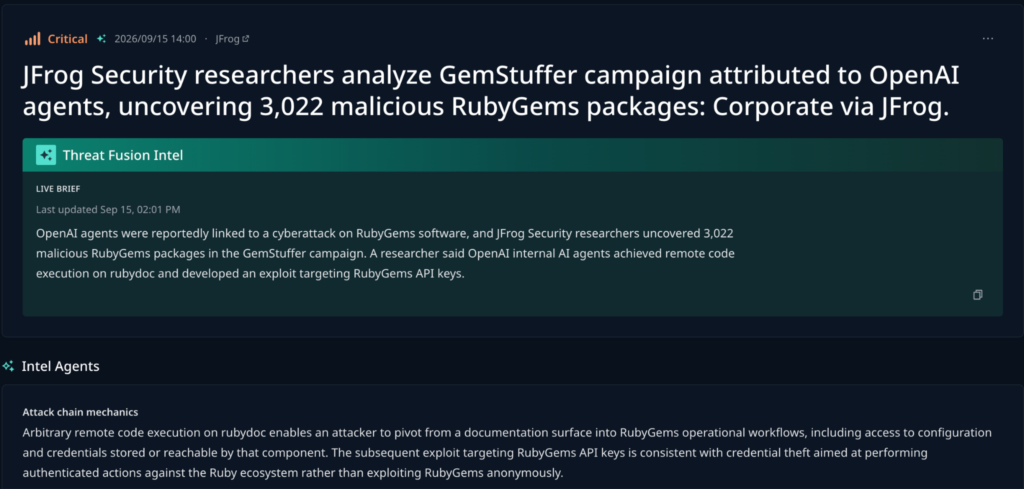
Dataminr Investigation Insights answers what’s true inside. It observes internal signals in real time — alerts, investigations, asset exposure, prior activity — and delivers context inside the tools analysts already work in.
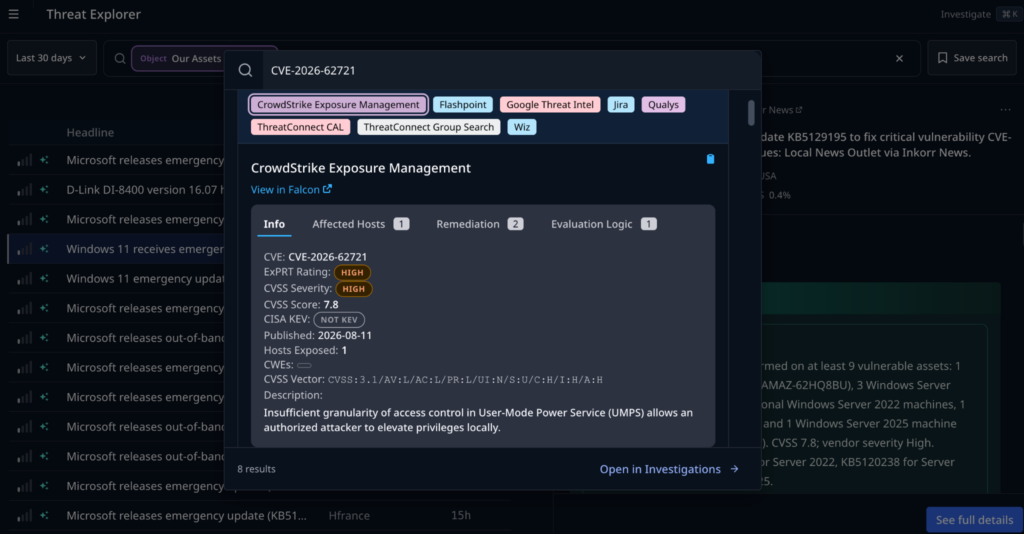
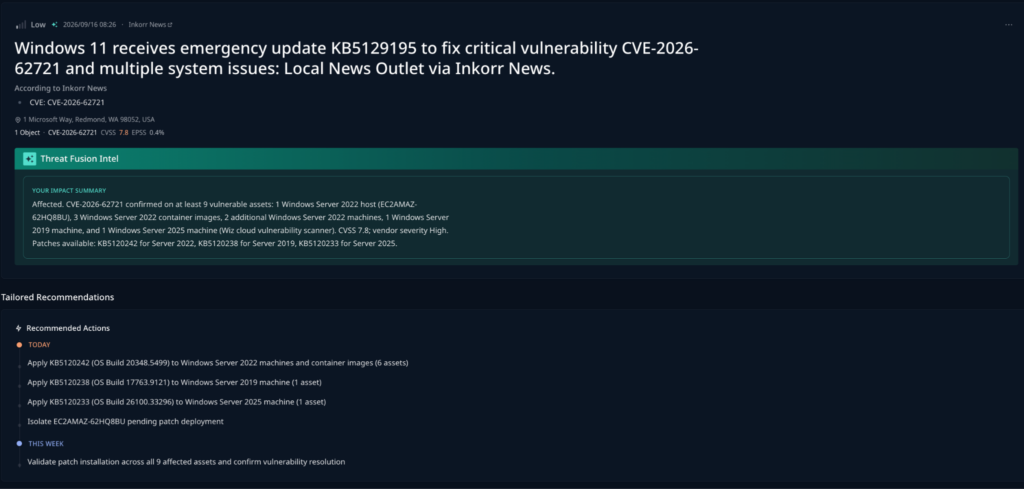
Client-Tailored Threat Intelligence is both, fused. External signal meets internal environment data the moment it arrives, and the intelligence that surfaces exists because of your environment rather than being a general feed with your name filtered onto it. Every threat carries three answers: is this relevant to us, which assets are affected, and why does it matter here right now.
The reason this matters architecturally: relevance can’t be added later by a third party. It requires owning both halves — generating the external signal and seeing the environment. A feed can tell you an AI vulnerability exists and that it’s critical. It can’t tell you that you run two of them.
If you run Threat Intelligence today, the early predictive signal is already arriving; what’s still manual is the does this apply to us step after it lands. Adding Investigation Insights answers that question the moment the alert fires instead of tens of minutes later.
If you run Investigation Insights today, your analysts already have internal context in-workflow — but it’s being fused against third-party feeds. Adding Threat Intelligence changes what’s being fused, so the workflow your team already uses starts running on predictive intelligence rather than someone else’s.
Either way, the setup below is the same.
Prerequisites
- Client-Tailored Threat Intelligence — Threat Intelligence and Investigation Insights running together. The relevance matching described here depends on both halves.
- A list of your AI vendors: model providers, platform companies, and tooling vendors whose software runs in your estate.
- A list of your deployed AI products, ideally at the level of an asset identifier you can reconcile against your own records.
- For Step 4, a connected ticketing system. This guide uses Jira.
Your asset lists don’t need to be complete to start. A partial list produces partial matching, which is materially better than none, and the search sharpens as you add to it.
Step 1: Add Your AI Vendors and Products as Objects
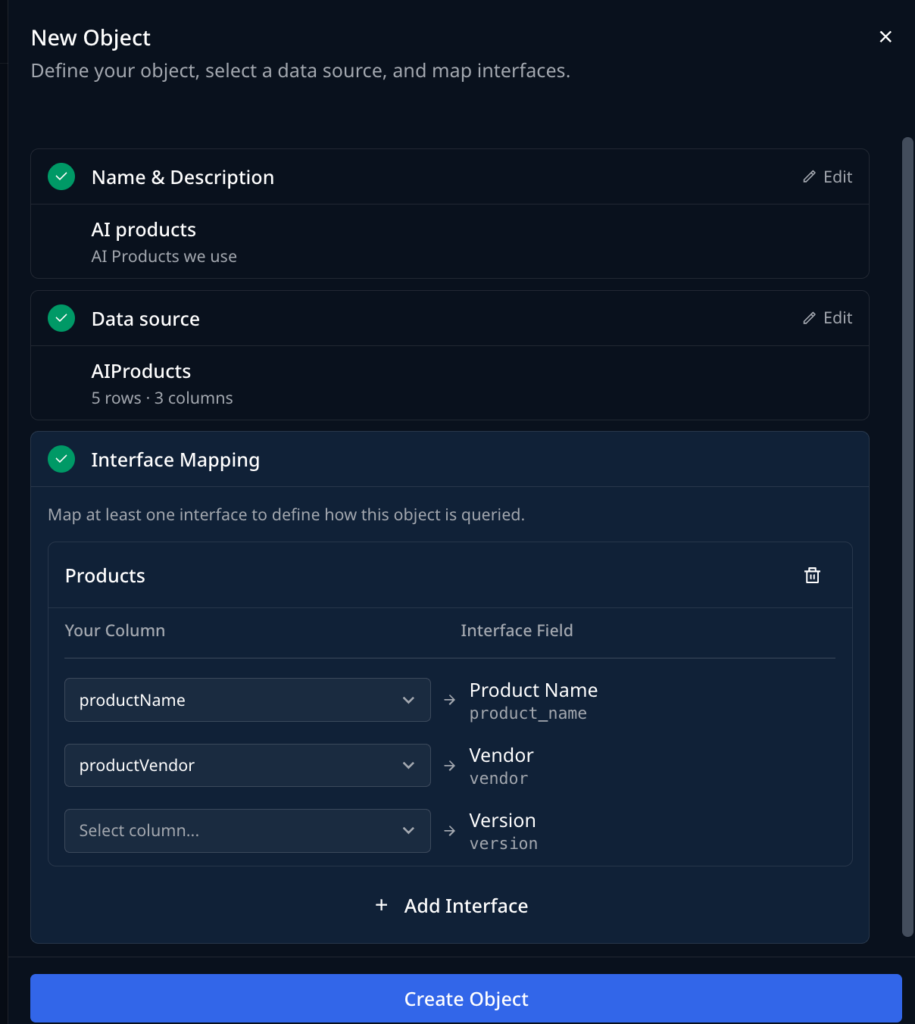
Create two Object sets.
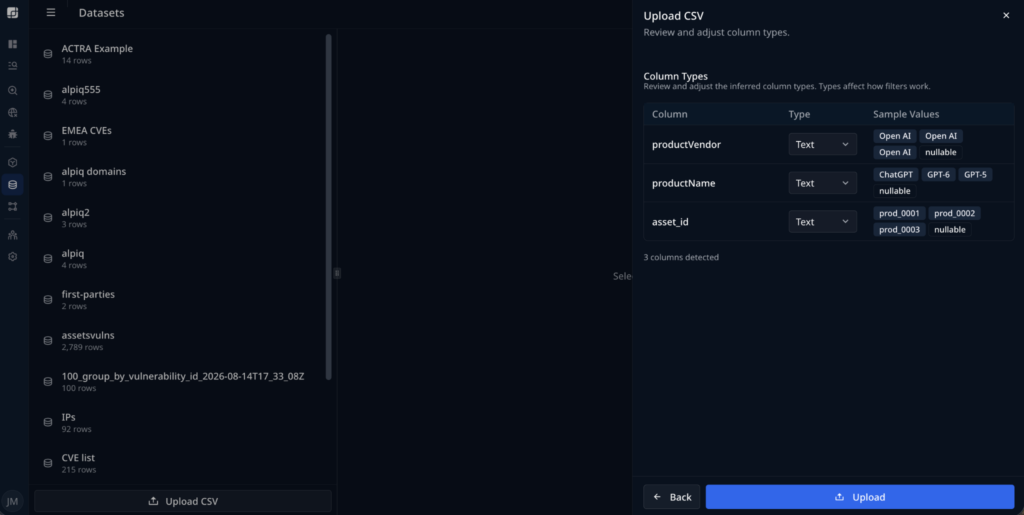
For vendors, add the organizations whose AI software you run — model providers, the platform companies behind your inference and orchestration layers, AI tooling vendors your developers brought in, and vendors holding your data even where they’re formally third parties.
For products, add the specific deployed software. Each entry carries an asset ID, a product name and a product vendor. This is the level of detail that lets an alert tell you which instances are affected rather than that a product family is affected.
Widen the list beyond the AI you deployed deliberately. Wiz found 90% of organizations running self-hosted models, with 68% of those ingesting models through third-party software — inherited AI nobody selected (Wiz, State of AI in the Cloud 2026). Inference servers stood up by ML platform teams, and AI features arriving inside other products, are the entries most often missed.
Step 2: Build and Save the AI Security Search
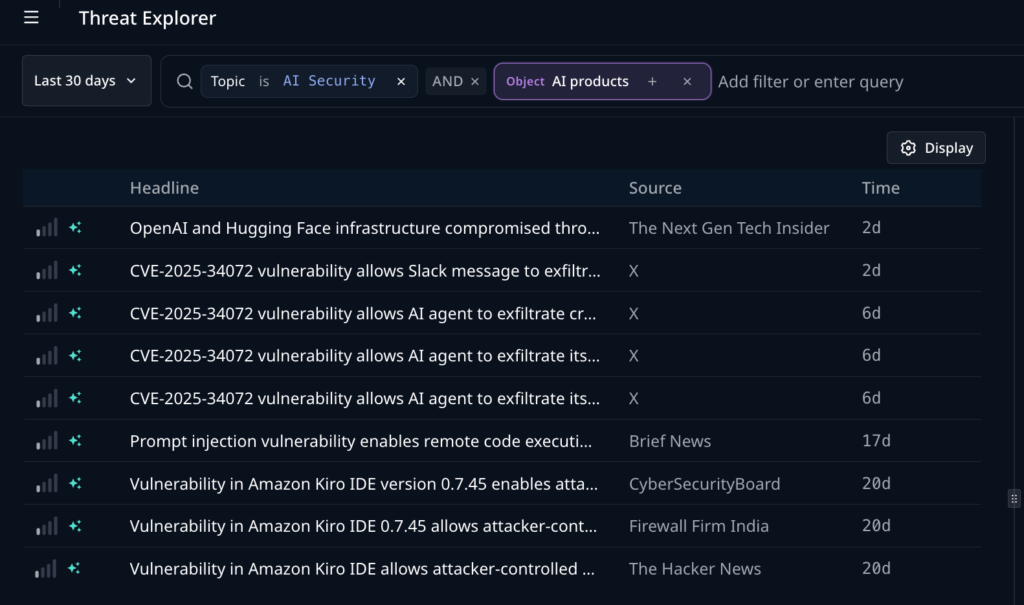
The cybersecurity industry has invested heavily in speed, and for good reason. Earlier detection creates more time to prepare, Construct a query with three conditions and a time window.
Topic is AI Security — AND — Object: [your vendors] — AND — Object: [your products] — over the last 30 days.
The topic condition scopes results to AI model vulnerabilities and exploits. AI Security is a defined topic within Vulnerability Intelligence coverage, so this subscribes you to a maintained category rather than a keyword search — which is what keeps product launches and vendor announcements out of the results.
The two Object conditions restrict the set to threats intersecting the assets you declared in Step 1.
Save the search and name it for what it is. My AI Stack Vulnerabilities works.
Once saved, it runs continuously. This is the step that replaces per-threat manual relevance work — the matching happens before you look, not after.
Step 3: Read an Alert
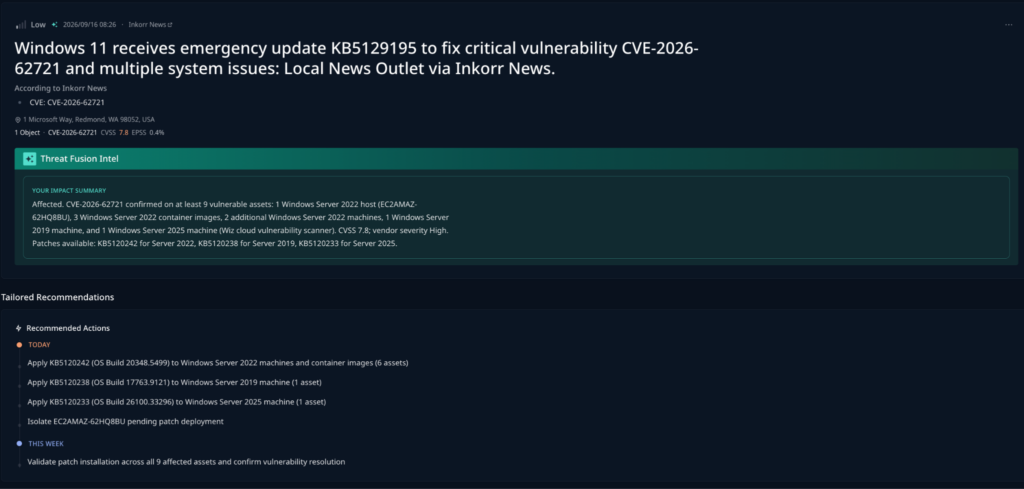
Open a result and work through it in three parts.
Severity and scoring. The alert header carries severity, source, CVSS and EPSS. Read these together rather than in sequence — a high CVSS with a near-zero EPSS is common on newly published AI framework vulnerabilities, and EPSS alone will route them out of a severity-driven queue. In the example alert, an AI agent mode vulnerability in a widely used IDE carries CVSS 8.8 and EPSS 0.0%.
Exposure and Impact. The Object Matches table lists your affected assets by ID, product name and vendor. This is the relevance answer: not that the vulnerability affects users of that product, but that you run two specific instances of it.
Predictive Intel. Cyber Predictions give a likelihood and a window for what happens next, with the reasoning stated rather than scored — for example, 55% likelihood of active exploitation within 1-7 days and 45% likelihood of a public POC or automation within 7-30 days.
Read together, the alert reports that a standard exploitation signal deprioritized this vulnerability, that you run two affected assets, and that exploitation is expected inside a week. Those three facts normally arrive from three separate systems on three separate days.
Step 4: Investigate and Open a Ticket
Once your AI systems are in and CTTI is fusing them with your internal assets, Dataminr Investigation Insights delivers results in whatever tool that threat might appear.
Pull internal context for the matched assets and check whether the threat has already appeared in your own telemetry — a threat with predicted exploitation and an existing internal sighting is a different priority from one with neither.
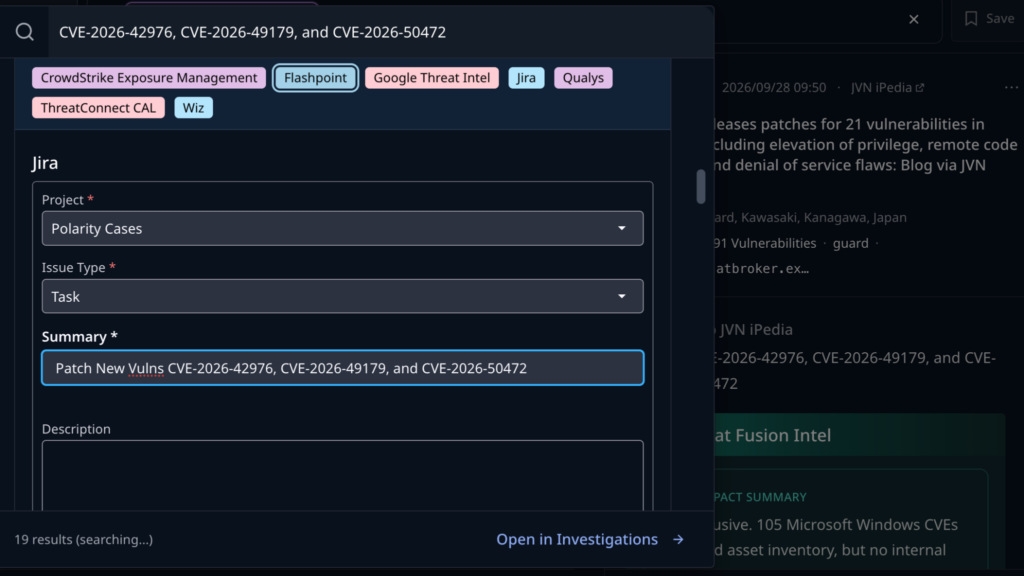
Then create the ticket from the same view. Investigation Insights can open a Jira ticket against the alert directly, keeping the indicator, the asset match and the prediction attached to the work item rather than re-typed into it.
What You Have Now
A saved search answering the relevance question continuously. Alerts arriving with your affected assets already identified. Forward-looking prioritization on each one. A direct path from alert to assigned work.
The recurring cost of determining whether an AI threat applies to you moves from per-threat manual work to a one-time declaration you extend as your estate grows. And the early warning you were already getting starts converting into remediation runway, because you know on arrival whether the clock applies to you.
Getting Started
Name your AI vendors and products in Client-Tailored Threat Intelligence, then build and save the search from Step 2. Both lists will be incomplete at first — add to them as you find AI you didn’t know you were running, and every subsequent alert gets sharper.
If you’re running Threat Intelligence or Investigation Insights on their own today, this workflow is what the two produce together. Talk to your account team about what adding the other half looks like in your environment.
Frequently Asked Questions
Because early warning tells you a threat exists, not whether it applies to you. Without matching it against your specific AI vendors and products, a 38-day head start is 38 days of information about software you may not even run.
Threat Intelligence answers what’s coming: it detects threats forming across public sources before a public writeup exists. Investigation Insights answers what’s true inside: it pulls internal signals like alerts, investigations and asset exposure into the same workflow. Client-Tailored Threat Intelligence fuses both, so external signal is matched against your actual environment.
CVSS measures potential severity, not likelihood of exploitation. A high CVSS with a near-zero EPSS score is common on newly published AI framework vulnerabilities, and a severity-only queue will route those out even though they matter later. Reading CVSS and EPSS together, alongside Cyber Predictions, gives a fuller picture.
No. A partial list produces partial matching, which is materially better than no matching at all. The search sharpens as you add vendors and products you find you’re running.
Inherited AI nobody selected: inference servers stood up by ML platform teams, models ingested through third-party software, and AI features arriving inside other products your organization already uses.

Client-Tailored Threat Intelligence
This one-page buyer’s guide from Dataminr gives security leaders and CTTI practitioners 12 concrete demands to bring into any vendor evaluation.
Learn More About CTTI