

Credential leak monitoring is detecting when your organization’s usernames and passwords surface on the public, deep or dark web, then confirming whose they are and getting them reset before an attacker uses them. Detection is the fast part. The handoff to the identity team is where the time goes.
Leaked credentials rarely turn into an attack overnight. According to the Verizon DBIR 2026, 73% of ransomware victims had an associated infostealer infection or credential leak event in the year prior to the attack, and 50% of those victims experienced that event within 95 days before the attack. That is a warning window, and most organizations have it.
What most of them don’t have is a fast way to use it. The alert arrives. Someone has to work out whether the account is real, whether the person still works there, what business unit they sit in and whether anyone has already reset it. Then someone has to tell the identity team. In most security teams that last step still happens by email, Slack or a walk across the floor.
A threat feed can tell you a credential leaked. It can’t tell you whose it is, because it has never seen your directory.
A leaked credential you can’t act on in hours isn’t early warning. It’s a backlog item.
This guide walks through closing that loop in Client-Tailored Threat Intelligence (CTTI), part of Dataminr® for Cyber Defense: from the leak alert, to the exposed credential, to the user’s identity record, to a routed password reset ticket, without leaving the alert. It’s written for SOC and IR teams who own the response, with or without a dedicated threat intelligence function.
What Client-Tailored Threat Intelligence brings to a credential leak
CTTI pairs two capabilities, each answering a different question.
- Dataminr Threat Intelligence answers “what’s coming.” It watches public, deep and dark web sources for leaked credentials, data exposure and account impersonation tied to the organizations you name as your own. For example, Dataminr alerted customers to the Oracle Cloud Infrastructure breach 3 hours before Oracle publicly responded to the allegations (Dataminr, 2025).
- Investigation Insights (formerly Polarity) answers “what’s true inside.” It searches the systems you already run, such as your identity provider and ticketing, and returns the answer without a query language.
The fusion is what makes a credential alert actionable: the external signal says an account leaked, and the internal search says whose it is and what has already been done about it.
Prerequisites
- CTTI. The internal half of this workflow comes from Investigation Insights, which CTTI includes. Threat Intelligence on its own will alert on the leak but won’t check your environment.
- Your first parties defined. Your company, parent company, subsidiaries and the domains you use. This is set up with your Dataminr team during onboarding, and new entities can be added later.
- Your identity provider and ticketing connected. This guide uses Microsoft Entra ID or Okta for identity and Jira for tickets.
- Credential access granted. Viewing exposed credential details is a per-user permission your tenant admin grants. Decide who on the team should have it.
- Know where detection starts. Alerts fire when a leak or dump surfaces in public, deep or dark web sources. If your requirement is monitoring raw infostealer logs before anything is posted, cover that separately.
Step 1: Save a first-party credential search so only your organizations’ leaks come through
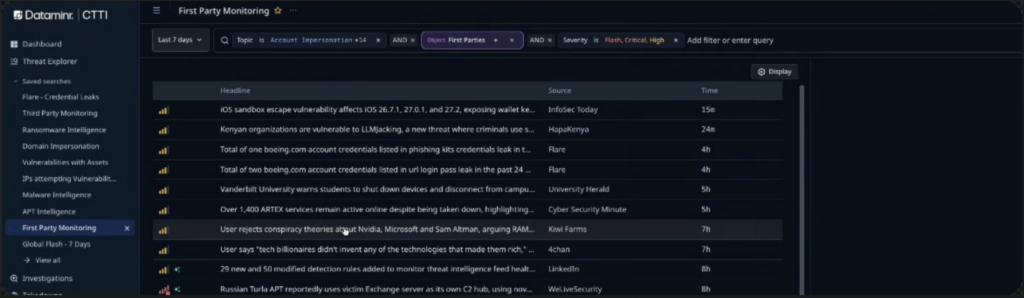
Open Threat Explorer and filter on the topics that cover exposure of your own accounts: Leaked Credentials and Doxxing, Data Exposure and Breaches, and Account Impersonation. Add your first-party list as a filter so only alerts about your organizations come through. Set the severity floor you want, then save the search so it sits in the left navigation under Saved searches.
Step 2: Read the alert and its impact summary to see what your own systems already know
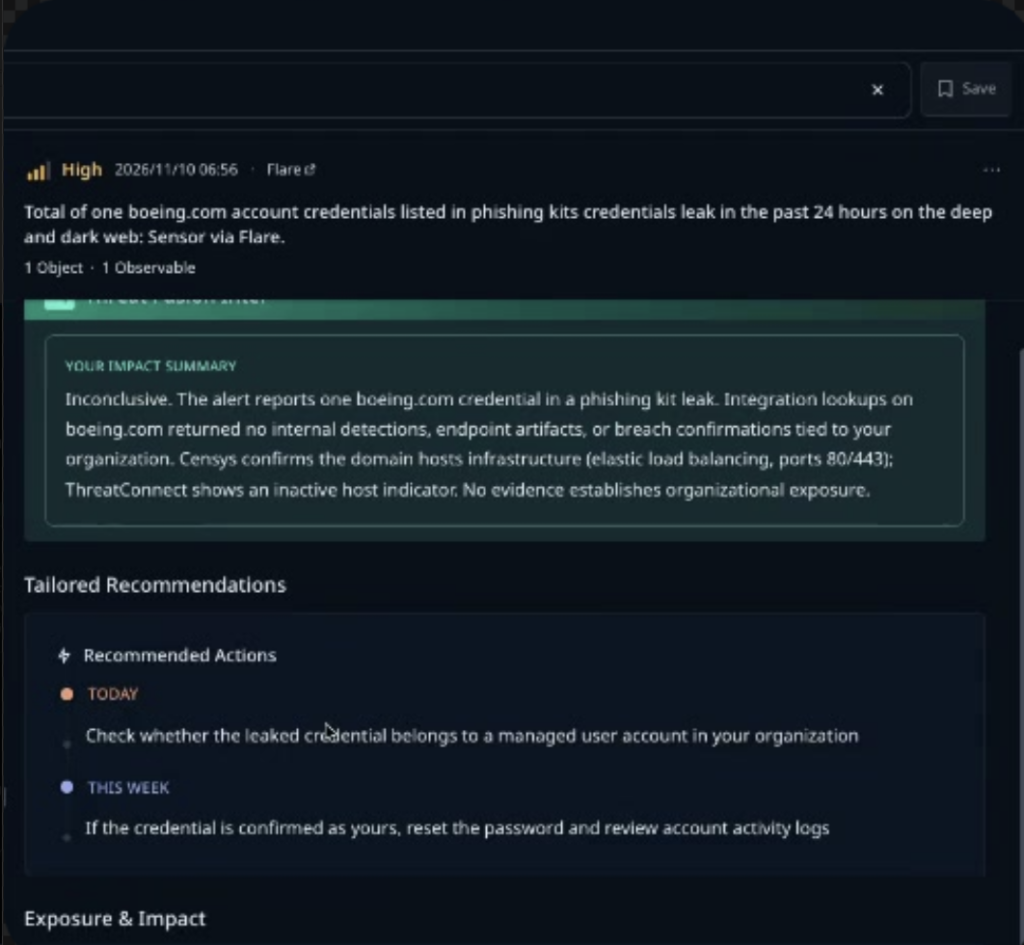
Open a credential alert. The top of the detail pane tells you what was found and where: for example, company account credentials listed in phishing kits on a deep web source in the past 24 hours.
Below it, Your Impact Summary reports what CTTI found when it checked your connected systems for the same entities. Read it carefully, because it says when it doesn’t know. If integration lookups return no internal detections, no endpoint artifacts and no breach confirmations, the summary says that no evidence establishes exposure. It doesn’t guess.
Tailored Recommendations sit underneath, grouped by when to act: Now, Today and This week. For a credential leak, the first is usually to confirm whether the leaked credential belongs to a managed account in your organization.
Step 3: Look up the leaked user across your identity provider and Jira in one search
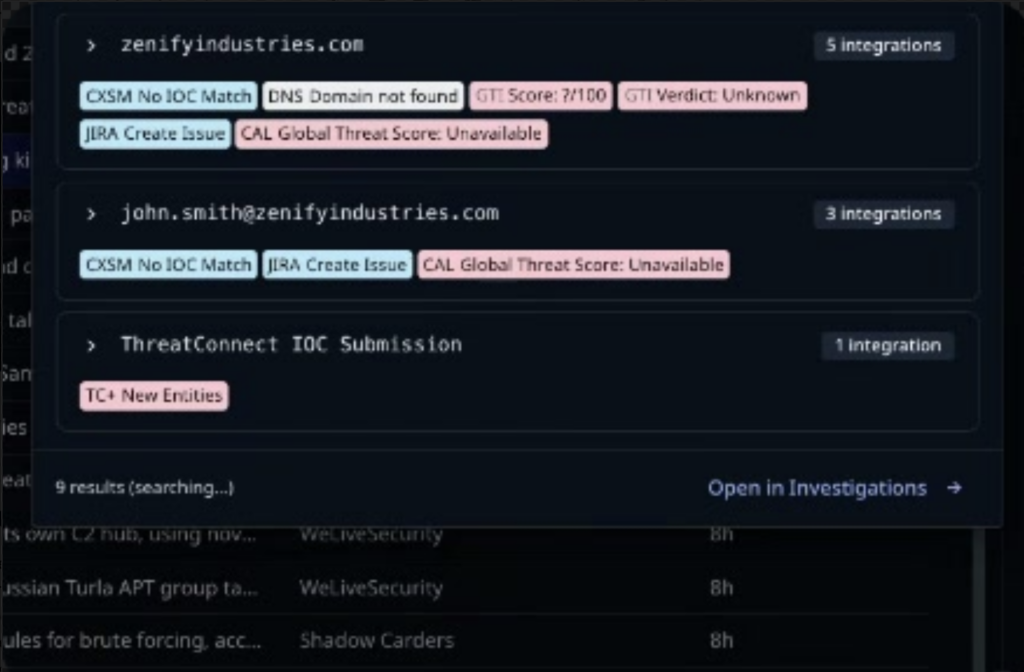
Press Ctrl+K to open an investigation search, and paste the email address from the alert. You can search one address or many at once.
CTTI queries your connected integrations together and returns what each one knows. The two that matter most here:
- Your identity provider, such as Microsoft Entra ID or Okta: who the user is, what business unit they belong to and whether they are still with the company.
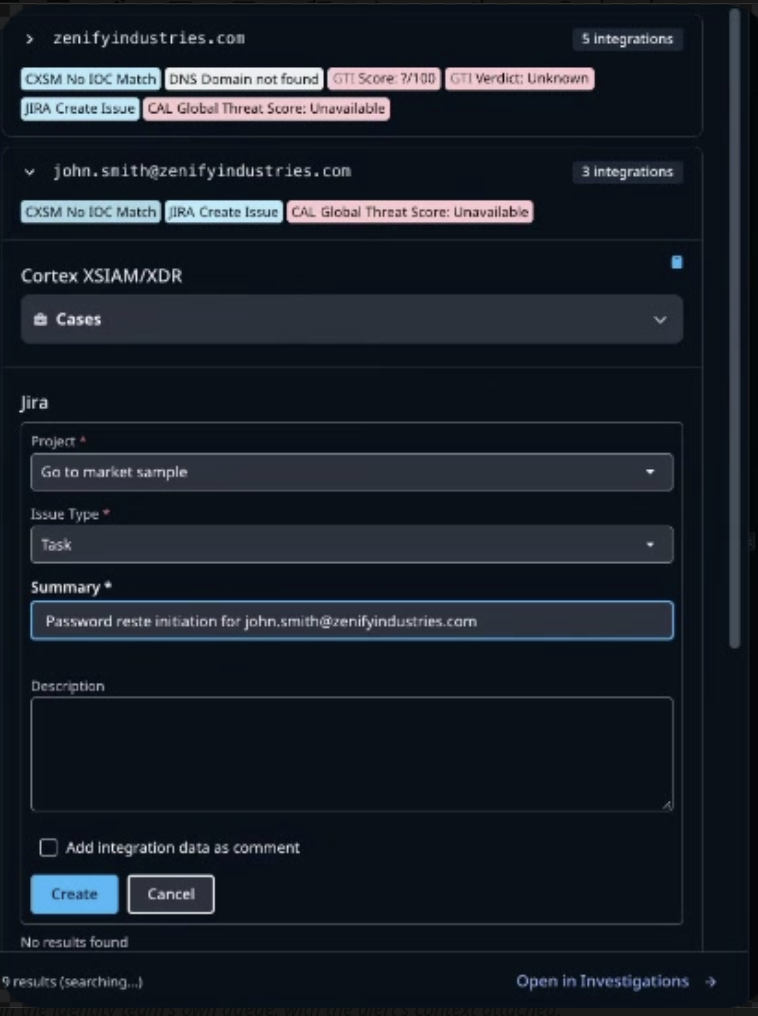
- Jira: whether a password reset ticket already exists for this user.
This is the step that usually takes the longest by hand, one console at a time. One Fortune 500 retailer described the change plainly: “It took a 2-5 min task and turned it into a 2 second task” (customer interview, 2024).
Step 4: Open the password reset ticket from the alert and route it to the identity team
If the user is current and no reset ticket exists, create one without leaving CTTI. From the Jira result, choose the issue type, write the summary (for example, “Password reset: credential exposed in phishing kit”) and assign it to the team that owns identity. The ticket routes through your existing workflow, so the identity team works it where they already work.
What you have now
- A saved search that surfaces leaks tied to your organizations and nothing else.
- An impact summary that tells you what your own systems show, and says so when they show nothing.
- A user lookup across identity and ticketing in one search instead of several consoles.
- A password reset routed to the right team from the alert itself.
The leak alert, the investigation and the handoff now happen in one place, inside the warning window instead of after it.
Getting started
List the entities you consider your own: parent company, subsidiaries and every domain your people sign in with. Then confirm which identity provider and ticketing system your team uses. Those two lists are the whole setup for this workflow. Your Dataminr account team can walk through both and connect the integrations.
Frequently asked questions
Does CTTI reset the password itself?
No. CTTI finds the leak, checks the account and opens the ticket. The reset happens in your identity provider, through the team and workflow you already have.
What if the impact summary can’t confirm the account is ours?
It will say so rather than guess. Use the Ctrl+K search in Step 3 to check the address against your identity provider directly.
Who can see the exposed credential values?
Only users your tenant admin has granted credential access. Treat that list like any other privileged access.
Does this catch raw infostealer logs?
Alerts fire when a leak or dump surfaces in public, deep or dark web sources. If you need coverage of raw stealer logs before anything is posted, plan for that separately.
Can I search more than one leaked account at a time?
Yes. The Ctrl+K investigation search accepts several addresses at once, which matters when a single dump names a whole team.
Which identity and ticketing tools does this work with?
This guide uses Microsoft Entra ID, Okta and Jira. For other tools in your stack, ask your Dataminr account team what’s connected today.