

Security teams are being asked to do more with less — more alerts, more data sources, less time to work through them. Splunk is often where that work happens, and where it slows down most. Every search starts with the same question: has this indicator touched our environment? Getting a fast, reliable answer usually depends on knowing exactly which SPL query to run, and that’s not something every analyst has memorized.
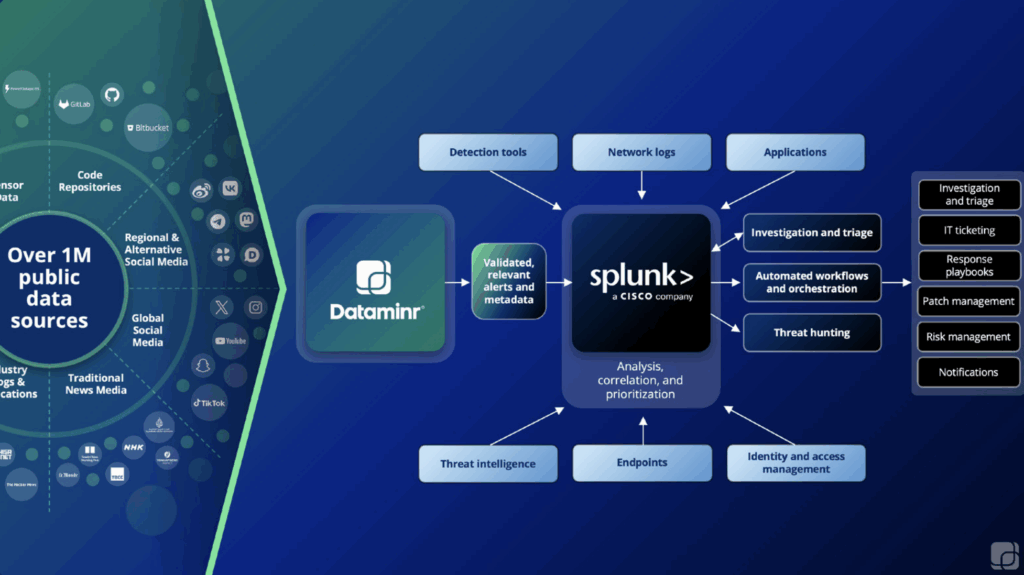
Dataminr Investigation Insights closes that gap. It automatically searches every connected data source for an indicator of compromise, Splunk included, and correlates what it finds with your internal telemetry: the fusion of what’s happening outside your environment with what’s actually running inside it. This means a CISO doesn’t have to hope a senior analyst is on shift to get the right query run correctly, and junior and senior analysts alike get the same fast, accurate answer every time.
Investigation Insights uses the {{ENTITY}} field to drop the indicator an analyst is looking at directly into the underlying Splunk query. That lets any analyst pull a consistent answer from Splunk without needing to know the Splunk Query Language.
Below are five queries senior analysts would otherwise have to write and run by hand. Investigation Insights can trigger each one automatically the moment an indicator needs a closer look.
1. Has This IP Address Shown up in Your Network Traffic?
tag=network tag=communicate (src_ip=”{{ENTITY}}” OR dest_ip=”{{ENTITY}}”) | head 10
Investigation Insights runs this alongside a check against your connected threat intelligence sources, so the analyst sees in one view whether the IP is known-malicious and where it has surfaced inside Splunk.
2. Which Windows Endpoints Have Failed Login Attempts?
Standard evidence for PCI, RMF, CMMC, and other compliance audits.
source=”*wineventlog:security” ((EventCode=4625 AND ta_windows_action!=error) OR EventCode=529 OR EventCode=530 OR EventCode=531 OR EventCode=532 OR EventCode=533 OR EventCode=534 OR EventCode=535 OR EventCode=536 OR EventCode=537 OR EventCode=539) dest=”{{ENTITY}}”
A second version of this query checks by user instead of endpoint:
tag=”authentication” action=”failure” (user={{ENTITY}} OR src_user={{ENTITY}})
3. What Processes Has This Endpoint Created?
Adversaries frequently create new processes, or hide behind legitimate binaries, to escalate privileges and run commands. This query is similar to the second one, and helps analysts quickly determine if processes have been created on Windows endpoints, as well as what those processes were.
source=”wineventlog:security” dest={{ENTITY}} EventCode=4688
4. Does This File Hash Exist Anywhere in Your Environment?
A file hash is often the starting point when working a phishing or malware case. Investigation Insights checks the hash against every connected data source, internal and external, in parallel, to confirm whether the file is malicious, and searches Splunk to see if it exists.
source=”wineventlog:microsoft-windows-sysmon/operational” (MD5={{ENTITY}} OR SHA1={{ENTITY}} OR IMPHASH={{ENTITY}} OR SHA256={{ENTITY}})
5. Is There a Privilege Escalation Attempt on This Linux Host?
sourcetype=linux_secure host={{ENTITY}} su* | where user!=root AND user!=””
These five queries are a starting point. With the right queries running automatically, analysts spend less time deciding what to search for and more time acting on what they find, delving deeper into various facets of security incidents with confidence. Dataminr Investigation Insights enables analysts to use Splunk’s extensive search capabilities without having previous knowledge of the Splunk Query Language.
Dataminr for Cyber Defense pairs this kind of internal signal correlation with client-tailored external threat intelligence, so Splunk becomes one part of a system that tells analysts not just what to search for, but what it means for their environment.
Supercharge Splunk with Real-Time Threat Intelligence
Detect emerging threats earlier and accelerate incident response with AI-powered, real-time external context.
Download Solution Sheet