With Dataminr, users gain relevant and actionable insights from intelligence sources within the platform. Then, based on that intelligence, users can take action by providing those insights to the necessary people and technologies in their security environment.
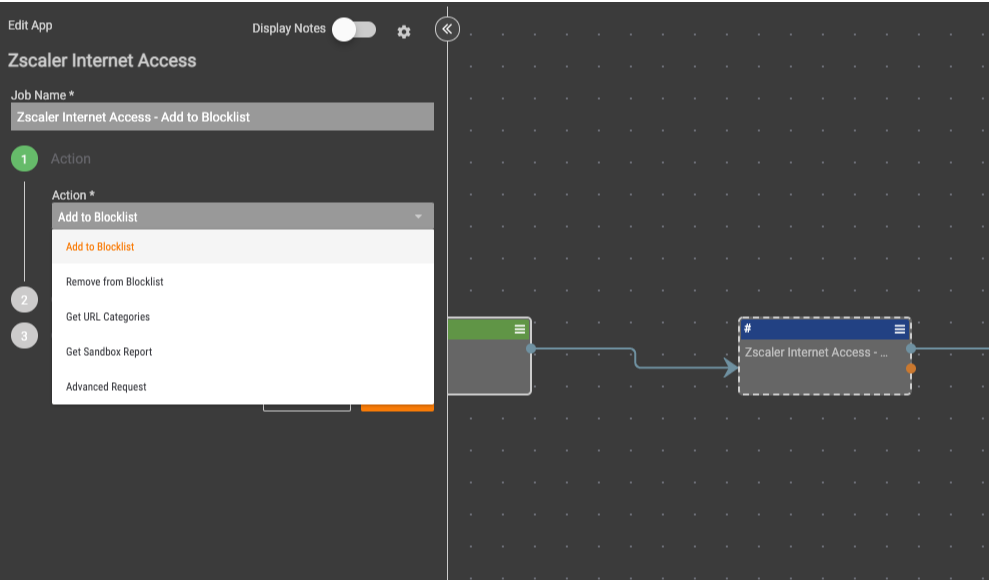
With the Zscaler Playbook App, you can quickly operationalize intelligence in your environment and turn network controls into an effective defense against threats. The following actions are available within the Playbook App:
- Add to Blocklist – Add the specified IOC to the ZIA blocklist.
- Remove from Blocklist- Remove the specified IOC to the ZIA blocklist.
- Get URL Categories – Retrieve the categories for a specified IOC from ZIA.
- Get Sandbox Report – Retrieve the sandbox report for a file quarantined by ZIA.
- Advanced Request – This action can be used to request additional API endpoints.
With the Zscaler Job App, you can send Host and/or URL indicators in bulk to Zscaler Internet Access blocklist based on filtering criteria such as tags, threat rating, or confidence rating. These indicators can also be optionally sent to a specific category in the URL categories section of the Zscaler Internet Access blocklist. If the category does not already exist, a new category will be created under the user-defined category section.
These apps can be found in the Dataminr App Catalog under the names: Zscaler Internet Access (Playbook), Zscaler Internet Access (Organization)