PARTNER INTEGRATION

Tenable

Tenable®️, Inc. is the Cyber Exposure company. Over 30,000 organizations around the globe rely on Tenable to understand and reduce cyber risk. As the creator of Nessus®️, Tenable extended its expertise in vulnerabilities to deliver the world’s first platform to see and secure any digital asset on any computing platform.

Tenable customers include more than 50 percent of the Fortune 500, more than 30 percent of the Global 2000 and large government agencies.

Integrated Dataminr Products
Agentic Threat Intelligence Platform
Investigation Insights

Tenable.io

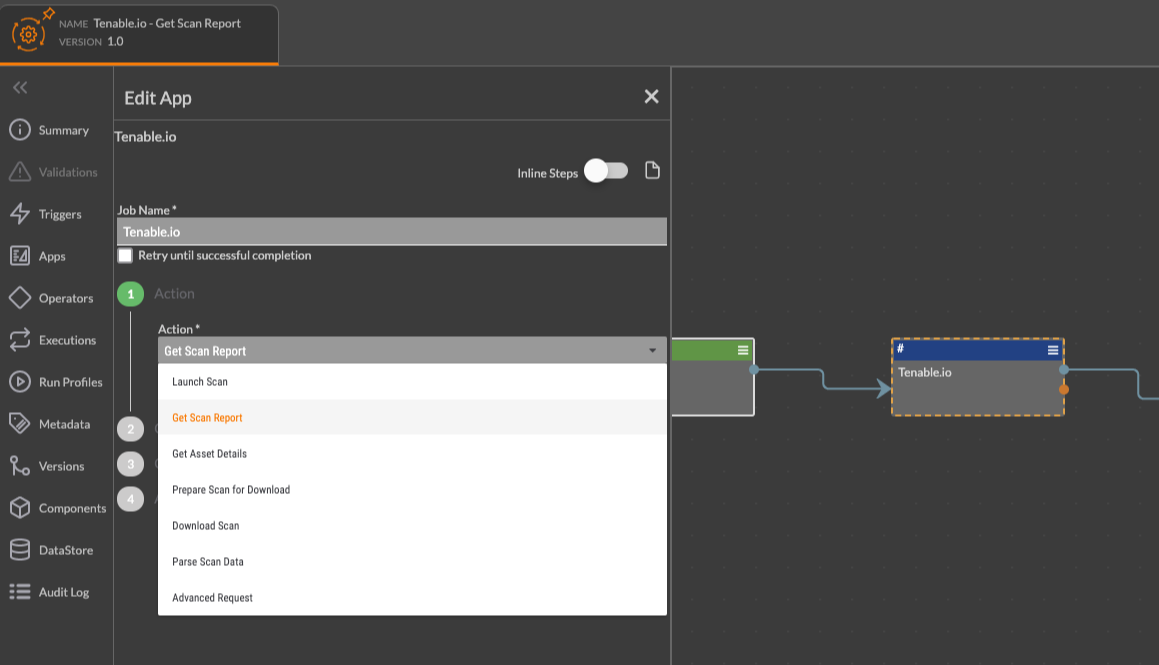
With this Playbook app, you can launch and get scans from Tenable.io into Dataminr for further analysis and investigation. Tenable.io is a cloud-based vulnerability management for complete visibility into the assets and vulnerabilities in your organization. This app integrates with Tenable.io to include actions with Dataminr Playbooks in order to increase accuracy and efficiency by saving analysts from routine tasks and increasing response time and accuracy.

The following actions are available within the Playbook App:

  • Launch Scan – Launch an existing scan using the Scan ID. You may want to launch a scan if you configured the scan to run on-demand only, or if you need to run a scheduled scan immediately.
  • Get Scan Report – Returns scan results for the latest run of the specified scan. Uses Scan ID. It’s recommended ‘Retry’ be configured for this action.
  • Get Asset Details – Returns details of the specified asset.
  • Get Asset Vulnerabilities – Retrieves a list of the vulnerabilities recorded for a specified asset. The list returned is limited to 5,000.
  • List Assets by Vulnerability – List all Assets associated with a specific Vulnerability.

This app can be found in the Dataminr app catalog under the name: Tenable.io
Tenable.sc

The Tenable integration compares CVE tags from sources in Dataminr and matches against Tenable scan results. Any matching unpatched vulnerabilities found within Tenable are associated with relevant intel in Dataminr. Additionally, tasks can be automatically created to notify users about the matching vulnerabilities with necessary details for further action to be taken.

  • Discover new threats by continuously scanning for indicators in assets using dynamically created watchlists in Tenable.
  • Take action in Tenable to audit for vulnerabilities in assets exploited by threats triggered in Dataminr.
  • The Dataminr Tenable app will communicate to Tenable via an API and pull the reports and map them into Dataminr. The fields being mapped are File, Host, & URL.
  • The API will indicate the indicator details, if it has been observed in Tenable.
  • Automation and customization with Playbooks to make it a more specific ingestion is easy to do using the Tenable API and defining what groups/devices [Company Name] wishes to bring in and how often they want to ingest the reports.
  • Other potential optimizations would be configuring the Tenable scans into groupings of external/NET facing. This will make the report ingestion simpler and more dynamic in nature over time.

This listing can be found in the Dataminr App Catalog under the name: Tenable.sc

Tenable SC with Investigation Insights

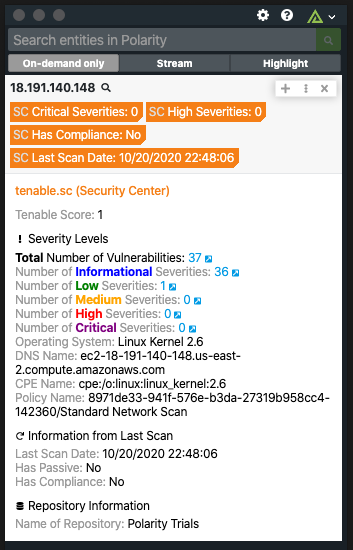
The Investigation Insights – Tenable SC integration searches IPs and domains against Tenable’s Security Center vulnerability system. Enabling analysts to quickly know if anything in their environment has any vulnerabilities associated with it.

Tenable IO with Investigation Insights

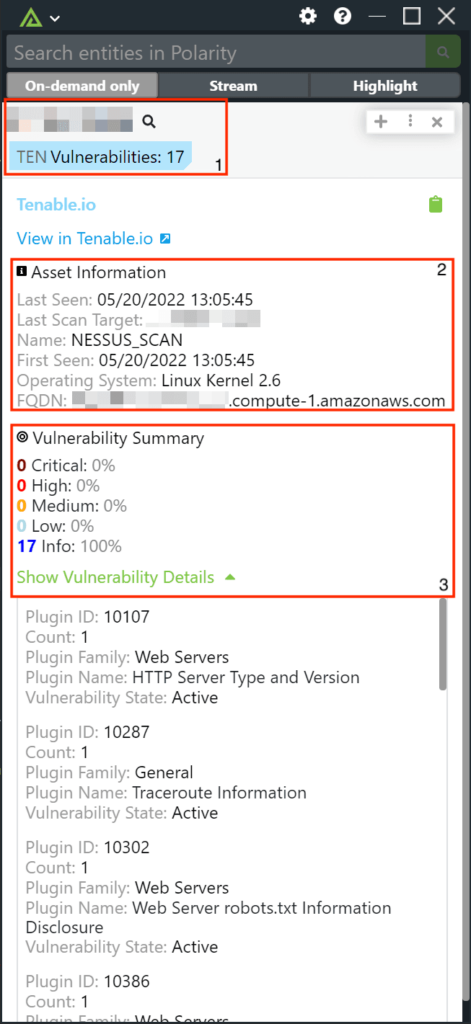
The Investigation Insights – Tenable IO integration searches IPs and domains against Tenable IO’s cloud vulnerability system. Enabling analysts to quickly know if anything in their environment has any vulnerabilities associated with it.

Examples

Tenable IO Data Overview

  • Summary Tags: When an analyst runs a search with the integration they will quickly understand the number of vulnerabilities that are associated with the asset.
  • Asset Information: When drilling into the details of the integration analysts can see an overview of the asset getting context around what the asset is, when it was scanned, what OS is running on the asset and more.
  • Vulnerability Information: While also looking at details, analysts can get insights into the vulnerabilities quickly understanding the criticality of the vulnerabilities and even drilling in for more context on what the vulnerabilities are.

Looking for Integration Not Shown