PARTNER INTEGRATION

Splunk

Splunk Inc. (NASDAQ: SPLK) provides the leading software platform for real-time Operational Intelligence. Splunk® software and cloud services enable organizations to search, monitor, analyze and visualize machine-generated big data coming from websites, applications, servers, networks, sensors and mobile devices.

More than 8,400 enterprises, government agencies, universities and service providers in more than 100 countries use Splunk software to deepen business and customer understanding, mitigate cybersecurity risk, prevent fraud, improve service performance and reduce cost.

Splunk products include Splunk® Enterprise, Splunk Cloud™, Hunk®, Splunk MINT Express™ and premium Splunk Apps.

Integrated Dataminr Products
Agentic Threat Intelligence Platform
Investigation Insights

How Splunk Enterprise Integrates With Dataminr's Threat Intelligence Platform

Dataminr provides the ability to aggregate threat intelligence from multiple sources (i.e., open source, commercial, communities, and internally created), analyze and track identified adversary infrastructure and capabilities, and put that refined knowledge to work in Splunk, identifying threats targeting organizations.

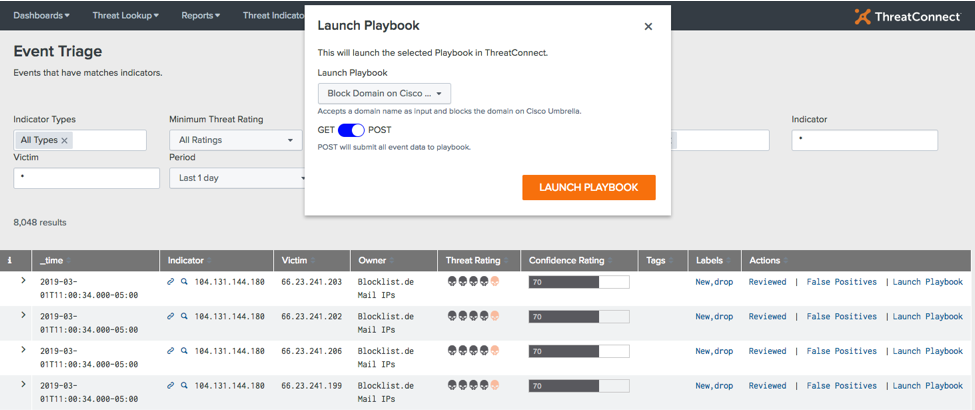
The Dataminr App for Splunk provides Splunk users the ability to leverage customizable threat intelligence integrated into Splunk from their Dataminr accounts and trigger Playbooks directly from the Splunk interface. The App takes users’ aggregated logs from Splunk and combines them with their threat intelligence in Dataminr. Dataminr provides context with indicators and enables their teams to easily spot abnormal trends and patterns to be able to act on them efficiently. Users can tie their data to Playbooks, Dataminr’s orchestration capability, to automate nearly any cybersecurity task and respond to threats faster directly from Splunk — as well as send to other systems like Carbon Black, ServiceNow, Palo Alto, or Tenable.

How Splunk and Dataminr Work Together

Using Splunk for threat intelligence management, you can:

  • Automate the detection of Advanced Threats in your environment: Use Dataminr Query Language (TQL) to tailor the data you import into Splunk. Then, you can operationalize multi-source threat intelligence.
  • Reduce False Positives to save time: Use timely, tailored, and accurate threat intelligence enriched and refined from several sources to reduce false positives. Use intel from Dataminr communities against network data and logs in Splunk Enterprise.
  • Prioritize events and respond to threats as they happen: Be proactive about threats and sort each by rating and confidence scores, relationship to known threats, past incidents, adversary groups, and tags. Get an overview of all Dataminr matches by intelligence source and data model search from your dashboard.

How Dataminr Enhances Splunk

There are many reasons to incorporate Splunk into your threat intelligence feeds. Some of the ways Dataminr enhances Splunk include:

  • Gives you the ability to apply tailored, relevant threat intelligence to your existing infrastructure
  • Allows you to centralize threat intelligence
  • Helps you develop process consistency
  • Allows you to scale your operations
  • Provides context to threat intelligence so your security team can detect abnormal patterns and trends and take immediate action
  • Allows you to easily mark false positives
  • Provides the option to enrich and take action on your intel automatically
  • Enables you to orchestrate security actions across your enterprise with Playbooks
  • Delivers alerts to block cyber threats and respond to incidents
  • Helps you correlate strategic and tactical threat intelligence with actionable machine-readable data from trusted communities
  • Provides built-in dashboards and reports to expedite time to value
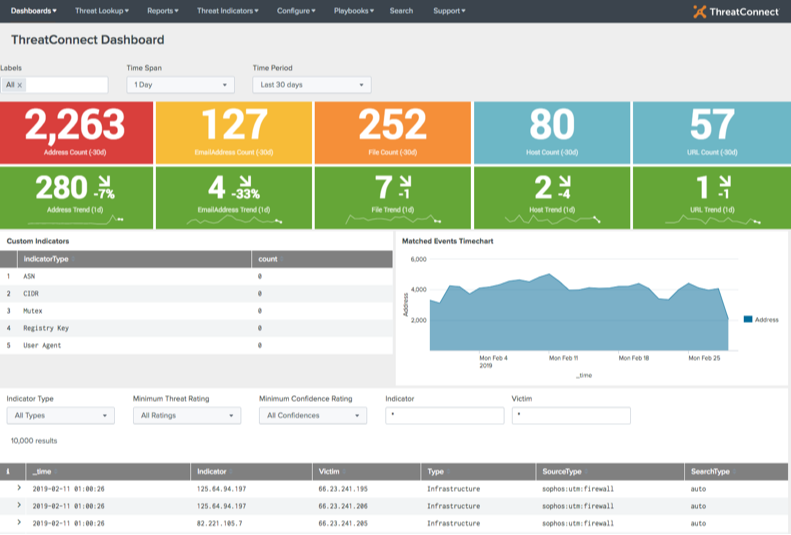
The Dataminr App for Splunk allows you to integrate threat intelligence into Splunk directly from your Dataminr account. You can also trigger Playbooks directly from the Splunk interface. To find the app, search for either Splunk (Playbook) or Splunk (Custom Trigger) in the Dataminr App Catalog. You can also find the app in Splunkbase as Dataminr App for Splunk.

How Splunk Enterprise Integrates With Dataminr's Threat Intelligence Platform

Dataminr provides the ability to aggregate threat intelligence from multiple sources (i.e., open source, commercial, communities, and internally created), analyze and track identified adversary infrastructure and capabilities, and put that refined knowledge to work in Splunk, identifying threats targeting organizations.

The Dataminr App for Splunk provides Splunk users the ability to leverage customizable threat intelligence integrated into Splunk from their Dataminr accounts and trigger Playbooks directly from the Splunk interface. The App takes users’ aggregated logs from Splunk and combines them with their threat intelligence in Dataminr. Dataminr provides context with indicators and enables their teams to easily spot abnormal trends and patterns to be able to act on them efficiently. Users can tie their data to Playbooks, Dataminr’s orchestration capability, to automate nearly any cybersecurity task and respond to threats faster directly from Splunk — as well as send to other systems like Carbon Black, ServiceNow, Palo Alto, or Tenable.

How Splunk and Dataminr Work Together

Using Splunk for threat intelligence management, you can:

  • Automate the detection of Advanced Threats in your environment: Use Dataminr Query Language (TQL) to tailor the data you import into Splunk. Then, you can operationalize multi-source threat intelligence. 
  • Reduce False Positives to save time: Use timely, tailored, and accurate threat intelligence enriched and refined from several sources, such as our Collective Analytics Layer (CAL), to reduce false positives. Use intel from Dataminr communities against network data and logs in Splunk Enterprise. 
  • Prioritize events and respond to threats as they happen: Be proactive about threats and sort each by rating and confidence scores, relationship to known threats, past incidents, adversary groups, and tags. Get an overview of all Dataminr matches by intelligence source and data model search from your dashboard.

How Dataminr Enhances Splunk

There are many reasons to incorporate Splunk into your threat intelligence feeds. Some of the ways Dataminr enhances Splunk include:

  • Gives you the ability to apply tailored, relevant threat intelligence to your existing infrastructure
  • Allows you to centralize threat intelligence
  • Helps you develop process consistency
  • Allows you to scale your operations
  • Provides context to threat intelligence so your security team can detect abnormal patterns and trends and take immediate action.
  • Allows you to easily mark false positives
  • Provides the option to enrich and take action on your intel automatically
  • Enables you to orchestrate security actions across your enterprise with Playbooks
  • Delivers alerts to block cyber threats and respond to incidents
  • Helps you correlate strategic and tactical threat intelligence with actionable machine-readable data from trusted communities
  • Provides built-in dashboards and reports to expedite time to value
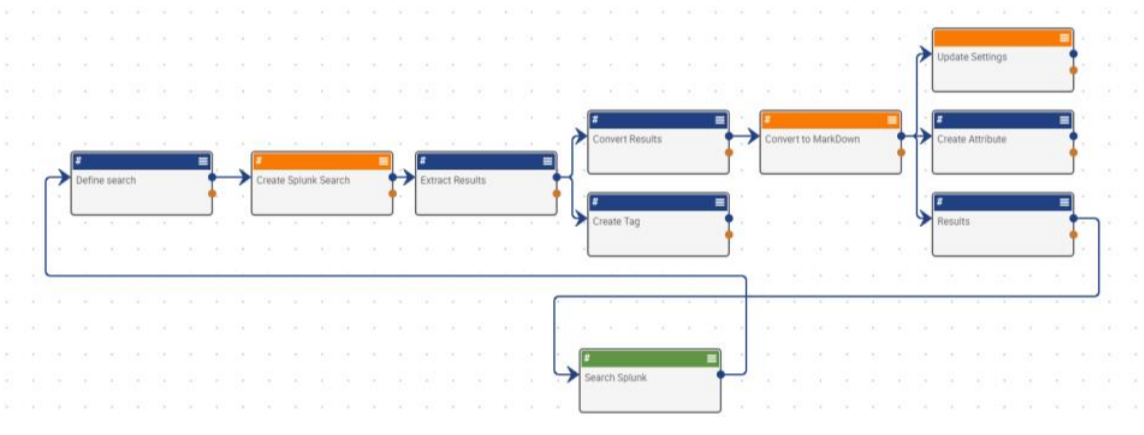
The Dataminr App for Splunk allows you to integrate threat intelligence into Splunk directly from your Dataminr account. You can also trigger Playbooks directly from the Splunk interface. To find the app, search for either Splunk (Playbook) or Splunk (Custom Trigger) in the Dataminr App Catalog. You can also find the app in Splunkbase as Dataminr App for Splunk

Contact Us Today to Learn More About Splunk Threat Intelligence

Using the Dataminr App for Splunk, you can apply relevant threat intelligence to your infrastructure, mark false positives, and take immediate and automatic action on your intel. Request a demo today to learn more.

Splunk Attack Analyzer

The Investigation Insights Integration searches the Splunk Attack Analyzer API for Attack Chain data for Domains, URLs, IPs, SHA256 Hashes and MD5 Hashes for phishing related activity and a Score Assessment.

TruSTAR with Investigation Insights

The Investigation Insights – TruSTAR integration allows Investigation Insights to search the TruSTAR API to return information about various indicator types. Enabling analysts to have quick insights into their threat intelligence.

Splunk with Investigation Insights

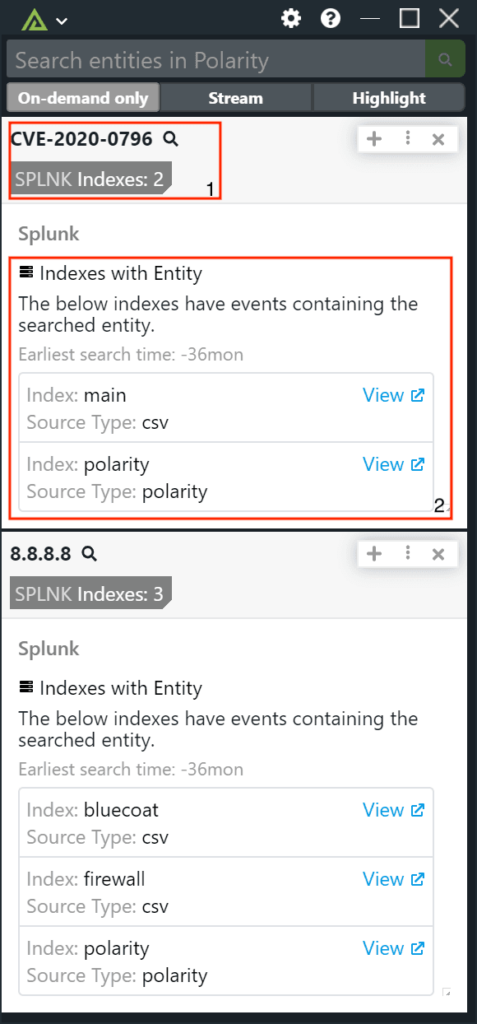
Investigation Insights’s Splunk integration allows a user to connect and search a Splunk Enterprise or Splunk Cloud instance with a customized search string. Additionally, the integration supports running an “Index discovery” meta search, as well as Splunk KVStore data. Enabling analysts to quickly run their Splunk searches without having to pivot from what they are working on.

The Investigation Insights- Splunk integration can be installed multiple times to support running multiple different searches across different indexes.

Examples

Splunk Searches

  • Summary Tags: The summary tags for Splunk are completely customizable by your or your Investigation Insights Admin. Any returned information from a search can be added as a summary tag in the summary fields option.
  • Earliest Search Time: Get a complete understanding of the search by understanding the time frame the search uses.
  • Data from Search: In this section you can view the data that comes back from the search that was specified in the integration. This data will change depending on the index searched. You can view the data multiple ways: in field form, json form, table form or source form.

Splunk Index Searches

  • Summary Tags: When using the Splunk integration for index discovery metasearch capability the Investigation Insights summary tags inform users on the number of indexes the indicator is located in.
  • Index Information: When looking at the details view in Investigation Insights users can see the index information the indicator is in and then pivot out to the index for further investigation.

Splunk SOAR with Investigation Insights

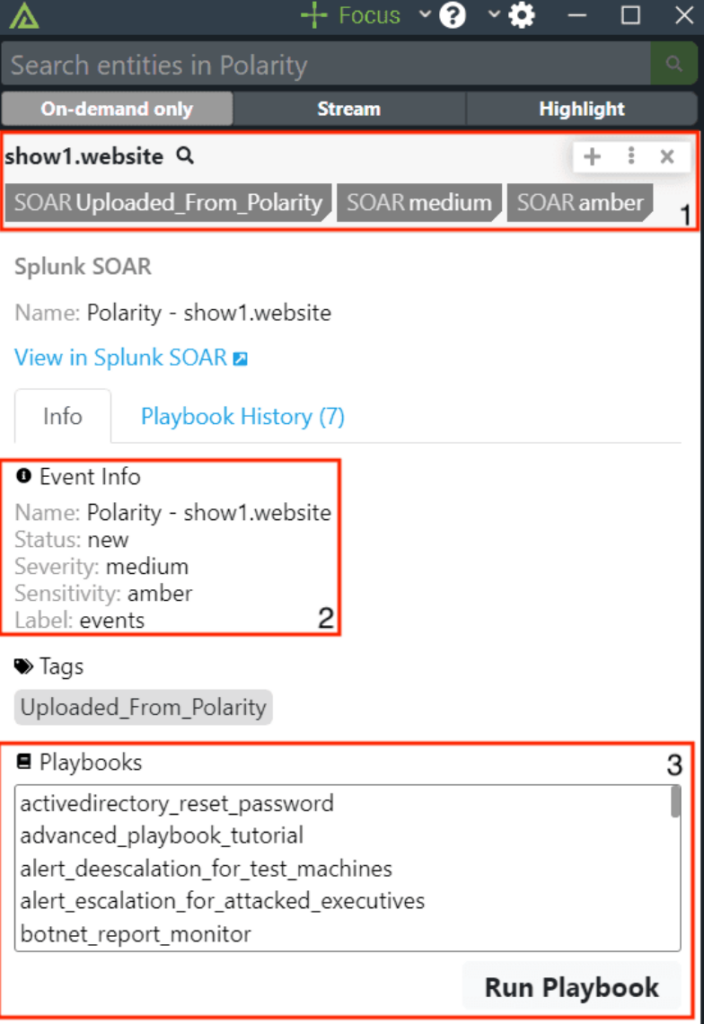
The Investigation Insights – Splunk Soar integration enables analysts to quickly query indicators in Splunk Soar to determine if it has been associated with a previous event and what the event was. The integration also enables analysts to quickly execute playbooks allowing them to block or update information on the fly.

Examples

Splunk Soar Data Overview – Events

  • Summary Tags: When an analyst runs a search with the Splunk Soar integration they will quickly be able to tell if the indicator searched has been associated with an event and the severity of the event.
  • Event Details: When drilling into the details of the integration analysts can see more context about the event(s) associated with the indicator. From what the event is, its severity, status and any associated labels or tags.
  • Playbook Execution: If the indicator in question needs more action analysts can quickly execute another playbook to take the necessary steps. Enabling quick decisions and fast results.

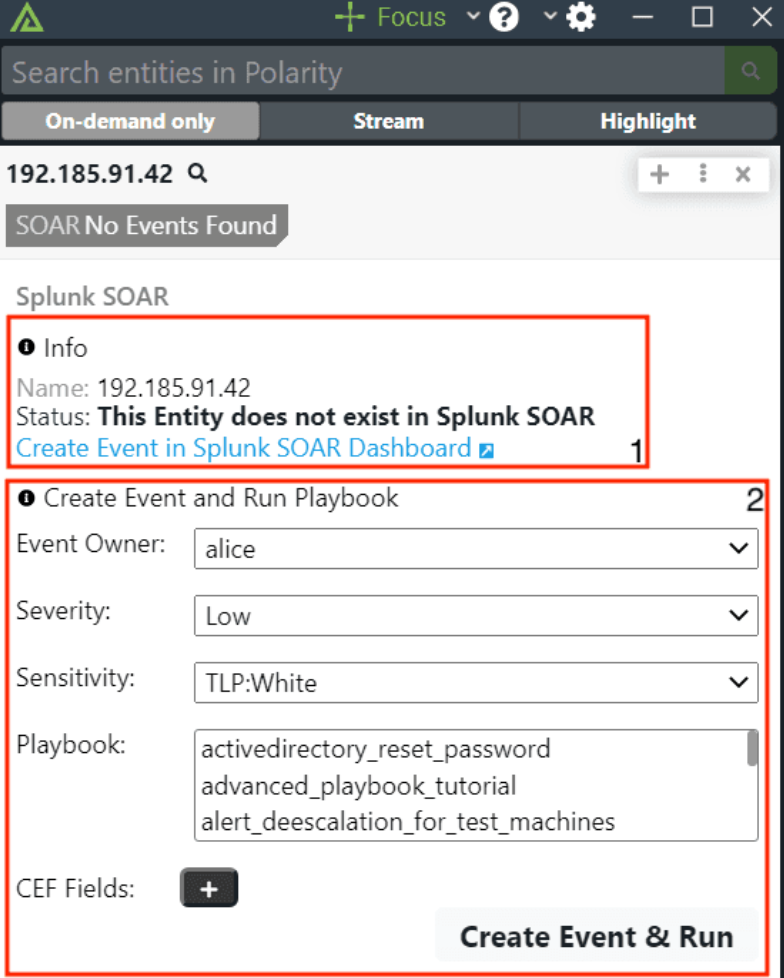
Splunk Soar Data Overview – Create Events

  • Create in Splunk Soar: When analysts drill into the Phantom integration with no associated events they can quickly pivot to Splunk Soar to create a new event.
  • Create and execute an event from Investigation Insights: If the analyst wasn’t to quickly create an event and run a playbook they can do so right from the Investigation Insights overlay window enabling really fast action and results on indicators in question.

Looking for Integration Not Shown