PARTNER INTEGRATION

Slack

Slack is a messaging app for business that connects people to the information they need. By bringing people together to work as one unified team, Slack transforms the way organizations communicate.

Integrated Dataminr Products
Agentic Threat Intelligence Platform
Investigation Insights

Slack

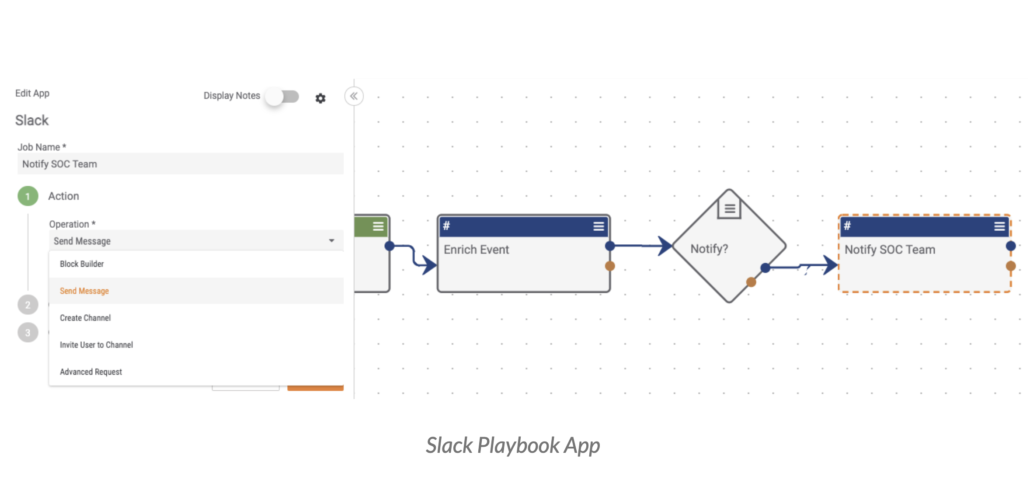
With the Slack Playbook app, you can automatically keep team members informed, get instant updates with notifications or escalations, and create channels as part of investigations. By automating this process, you turn your Slack workspace into a workbench to quickly work through investigations and remediations. The following actions are available:

  • Send Message – Sends a message to a channel. This action can send a simple text message as well as message blocks from the Block Builder action. When using Send Message do not include ‘@’ and make sure not to use the Display Name, instead using the same name you would normally ‘@’. When sending blocks the key field indicates the order in which you would like the blocks sorted.(Blocks are sorted by value of the key using ASCII sort.)
  • Block Builder – Creates a Block to be used as part of the Send Message action.
  • Create Channel – Creates a public or private channel-based conversation.
  • Invite User to Channel – Invites users to a channel.

This app can be found in the Dataminr App Catalog under the name: Slack.
Slack with Investigation Insights

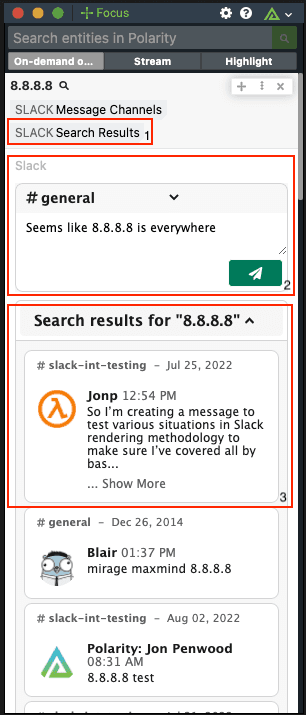
The Investigation Insights – Slack Integration allows you to send messages to Slack channels directly from the Investigation Insights Overlay Window, and search entities in Slack channel messages for all entity types.

Install this integration to enable analysts to quickly understand if an indicator has been discussed by your team and to send messages about an indicator to other members in a Slack channel.

Examples

Slack Data Overview

The Investigation Insights-Slack integration enables analysts to search Slack channels and submit messages into Slack channels. The data will vary pending on what options your admins have set for the integration.

  • Summary Tags: The Investigation Insights – Slack summary tags you will be able to quickly know if you can submit messages and if there are related discussions about the indicator.
  • Submit Messages: If enabled, you can quickly send a message to the predefined channel in Slack. Immediately notifying other teammates of something that might not look right, or just asking a question.
  • Search Results: If searching is enabled for the integration, analysts can quickly see and pivot to the discussions around the indicator that was looked up. Quickly navigating between the different channels to get a complete understanding of the discussions.

Looking for Integration Not Shown